Custom cone sleeves need only a logo to start, but the best results come from a vector file, exact brand color codes, short copy and a careful proof review. Customized Cone Sleeves turns whatever artwork you have into a free mockup within 24 hours, shaped to the arc of the sleeve, with unlimited free revisions before anything prints.
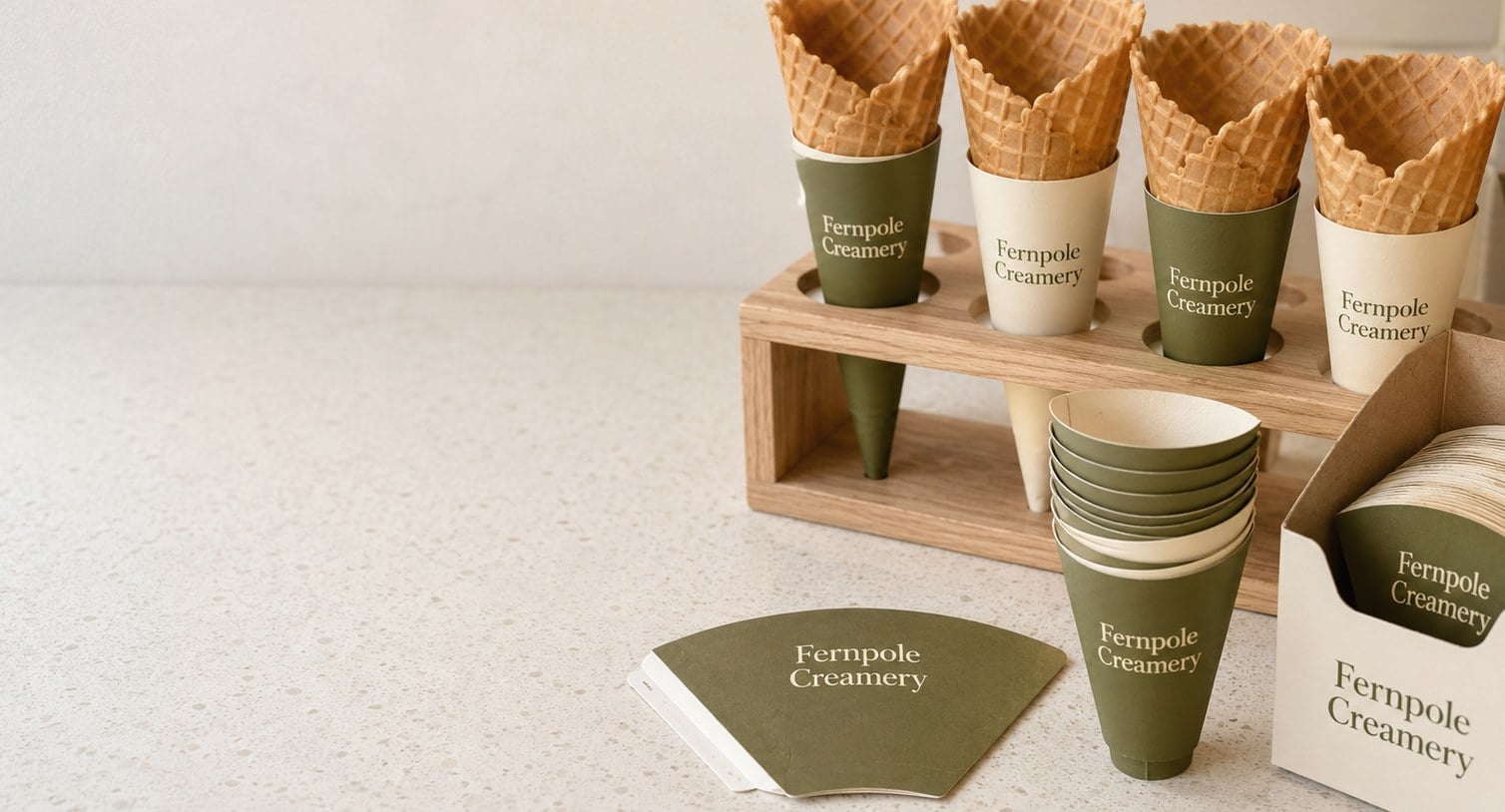
- Vector logos (AI, EPS, SVG, vector PDF) give the sharpest cone sleeves
- Logo belongs on the front panel; keep the back overlap clear
- Free mockup within 24 hours with unlimited free revisions
- Standard turnaround about 2 weeks after proof approval
- Pay nothing until you approve the design
What artwork does Customized Cone Sleeves need to start a cone sleeve design?
Customized Cone Sleeves needs only your logo, a sentence about how the cone sleeves will be used and any colors or wording you want to keep. That is enough for the design team to return a free mockup within 24 hours. You do not need a finished layout, a template or a designer on staff, because the arc-shaped layout is built for you.
The more context you add, the closer the first mockup lands. Useful extras include:
- Your cone type. Waffle cones, sugar cones, kids cones and fry cones each take a different sleeve, and the artwork is arranged to suit that shape.
- Your brand colors. Name them or send a brand guide if you have one.
- Secondary text. A tagline, web address, social handle or location line.
- Where the cones are served. A parlour counter, a food truck window or a festival stall changes what needs to read from a distance.
If you only have a logo on a sign, a menu or an old cup, send a clear photo of it anyway. The team will tell you whether the image is usable for printing or whether a cleaner version is needed, and the quote form at get a custom quote accepts whatever you have.
Which file formats work best for custom cone sleeve printing?
Vector files are the best format for custom cone sleeves because they stay sharp at any size and let the designer recolor or reshape the logo to follow the curve of the sleeve. A vector logo is usually saved as AI, EPS, SVG or a PDF exported from design software. High-resolution PNG or JPG files also work for photos and detailed illustrations.
| File type | Best for | What to watch |
|---|---|---|
| AI, EPS, SVG | Logos, wordmarks, simple icons | Fonts should be converted to outlines or sent separately |
| Vector PDF | Logos exported from most design tools | A PDF that only wraps a pasted photo is not vector |
| High-resolution PNG | Logos with transparent backgrounds, illustrations | Must be the original file, not a screenshot |
| High-resolution JPG | Product photos, full-color scenes | White box behind the image unless the background is removed |
| Phone photo or sketch | Starting point only | The design team redraws or cleans it before printing |
If you are unsure what you have, ask whoever designed your sign or menu board for the “original logo files”. Most designers keep a vector version even when the business only ever received a JPG. When no source file exists, Customized Cone Sleeves will flag it on the mockup rather than printing a soft or blurry logo.
Where should the logo and text sit on a cone sleeve?
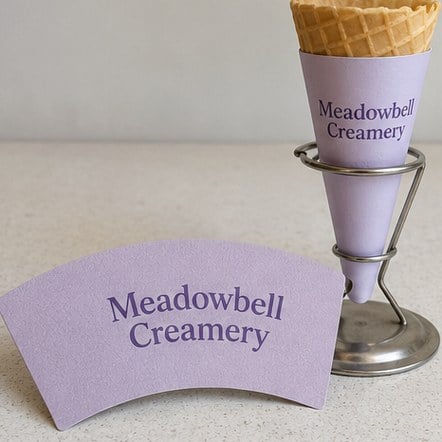
The logo on a cone sleeve should sit in the center of the front panel, the area a customer sees when the cone is handed across the counter. Secondary text such as a web address or tagline belongs below or beside the logo on the same panel. The overlap at the back of the sleeve, where the two ends meet, should stay free of important artwork.
A cone sleeve is not a rectangle. Flat, the sleeve is a curved arc, and when it wraps around the cone the top edge becomes wider than the bottom edge. That means the space near the top of the sleeve is generous and the space near the narrow bottom is tight. Keep long words and wide logos toward the upper part of the sleeve, and use the lower part for small icons, patterns or color.
Three placement habits keep artwork safe:
- Leave breathing room near every edge so nothing important is lost to the fold or the cone rim.
- Repeat a small mark on the back panel if you want branding visible from every angle.
- Keep text horizontal on the front panel; Customized Cone Sleeves lays it along the arc so it reads level once wrapped.
The full-color printed cone sleeves page shows how all-over patterns can fill the remaining space without crowding the logo.
How should brand colors be specified for custom cone sleeves?
Brand colors for custom cone sleeves are best specified with the exact codes from your brand guide, such as Pantone, CMYK or HEX values. Sending codes removes guesswork and gives the printer a fixed target. If you have no codes, send a physical sample like a printed menu or a cup, and describe the color in words on the quote form.
Screens are a weak reference for color. The same logo can look brighter on a phone than on a laptop, and neither matches ink on paperboard exactly. A mockup from Customized Cone Sleeves shows layout and color choices, but treat on-screen color as a close preview rather than a guarantee.
A few color choices make cone sleeves look better in the hand:
- High contrast. A dark logo on a light background, or the reverse, reads from across a parlour or down a festival lane.
- Fewer competing colors. A logo plus one or two accent colors usually looks cleaner than a rainbow of brand shades.
- Food-friendly palettes. Warm creams, berry tones and chocolate browns suit ice cream; bold reds and yellows suit fries and snacks.
If your brand has a light version and a dark version of the logo, send both so the designer can pick the one that suits the sleeve background.
How large should text and logos be on a cone sleeve?
Text and logos on a cone sleeve should be large enough to read at arm’s length, because that is the distance between a customer’s eyes and the cone they are holding. The logo should be the clear focal point of the front panel. Secondary lines such as a web address should be noticeably smaller but still bold enough to read without squinting.
Cone sleeves are small printed items, and every extra line of text shrinks everything else. A useful rule is to rank the content before the mockup is drawn:
- Your logo or shop name, the one thing every customer should remember.
- One supporting line, such as a tagline, a flavor name or a location.
- One action, such as a web address, social handle or QR code.
Anything beyond those three usually belongs on a menu board, not a sleeve. Thin script fonts, tiny legal lines and long addresses are the details that tend to blur or disappear once the sleeve wraps around a waffle cone. Bold, simple lettering survives the curve, the fold and the grip of a hand.
Kids cones are smaller again, so the kids and mini cone sleeves range works best with a single character or icon rather than text. Customized Cone Sleeves will suggest trimming copy on the mockup if a layout looks crowded.
What should you check on a cone sleeve proof before approving it?
Before approving a cone sleeve proof, check spelling, logo version, colors, the cone style the proof was drawn for and the placement of every element on the front panel. The proof is the last point where changes are free and fast. Once you approve, Customized Cone Sleeves moves the order into production on the standard turnaround of about 2 weeks.
Work through the proof in this order:
- Spelling and wording. Read every word aloud, including the web address and social handle. Type the URL into a browser to confirm it works.
- Logo version. Confirm it is the current logo, not an older version found online.
- Colors. Compare the proof against your brand codes or physical sample, not against memory.
- Cone style. Confirm the proof is for the right sleeve: waffle, sugar, kids or fry.
- Placement. Check that the logo is centered on the front panel and nothing important sits on the overlap.
- QR codes. Scan the code on the proof with two different phones.
Revisions are unlimited and free, so ask for a change whenever something feels off. You pay nothing until you approve the design, which means a careful proof review costs time, not money. Read how it works for the full approval sequence.
Can one set of cone sleeve artwork cover waffle, sugar and fry cones?
One set of cone sleeve artwork can cover waffle, sugar and fry cones, but each sleeve style needs its own adjusted layout. The logo, colors and fonts stay the same, while the arrangement changes to suit each sleeve’s shape and size. Customized Cone Sleeves can prepare matching mockups for every style in one request.
Waffle cone sleeves are taller and wider, so they can carry a logo plus a tagline comfortably. Sugar cone sleeves are narrower and favor a compact logo. Fry and snack sleeves often suit bolder, simpler artwork that holds up next to sauces and salt. The waffle vs sugar cone sleeves guide covers the shape differences in detail, and the fry and snack cone sleeves page shows the savory side of the range.
Planning artwork as a family from the start saves time later. Ask for all the styles you serve on the first quote, approve them together and file the approved artwork so every reorder matches. For shops placing a large run across several styles, the bulk custom cone sleeves with logo guide explains how a single order can be organized across sleeve types.
Frequently asked questions
Which file type should a shop send for its cone sleeve logo?
A vector file is the best choice for a cone sleeve logo, ideally AI, EPS, SVG or a vector PDF. Vector artwork stays crisp at any size and lets the designer bend the layout along the sleeve's arc without losing sharpness. If only a PNG or JPG exists, send the largest original version, and Customized Cone Sleeves will say on the mockup whether it is clean enough to print.
Can a cone sleeve design be started from a hand-drawn sketch?
A cone sleeve design can start from a hand-drawn sketch, a napkin drawing or a photo of a painted sign. Customized Cone Sleeves uses the sketch as a reference and returns a free mockup within 24 hours showing how the idea looks on the actual sleeve. Unlimited free revisions mean you can refine the drawing step by step until it feels right.
Does the overlap at the back of a cone sleeve limit where artwork can go?
The overlap at the back of a cone sleeve is where the two ends of the sleeve meet, so logos and text should stay clear of that strip. Patterns and background colors can run across it without a problem. Customized Cone Sleeves keeps important artwork on the front panel by default, and you can confirm the placement on the free mockup before approving anything.
Should a dark logo get a light outline on a colored cone sleeve?
A dark logo on a dark or busy cone sleeve background often benefits from a thin light outline or a light panel behind it. The outline separates the mark from the background so it reads at arm's length. Customized Cone Sleeves can show the logo with and without an outline on the mockup, so you can compare both versions before choosing.
How should a wide horizontal logo be handled on a cone sleeve?
A wide horizontal logo on a cone sleeve works best placed toward the upper part of the front panel, where the sleeve is widest. If the logo is very long, a stacked version or an icon-only version may read better. Customized Cone Sleeves will test the layout on the mockup and suggest a stacked arrangement if the full logo starts to crowd the edges.
Can a franchise send a brand guide instead of separate cone sleeve files?
A franchise or multi-location brand can send its brand guide for cone sleeve artwork instead of collecting files from each location. The guide gives the designer approved logos, color codes and fonts in one place. Customized Cone Sleeves then builds a consistent sleeve design that every location can reorder, with location-specific wording added only where the brand rules allow it.
Can allergen or ingredient notes be printed on cone sleeves?
Short allergen or ingredient reminders can be printed on cone sleeves, such as a line pointing customers to ask staff about allergens. Detailed ingredient lists rarely fit and change too often to print. Because the wording is your responsibility, confirm it with your own food safety guidance first, then add it to the quote request so Customized Cone Sleeves can place it clearly.
Can a cone sleeve show a web address and a social handle together?
A cone sleeve can show both a web address and a social handle, but the two lines compete for limited space on the front panel. Many shops pick one, or put the handle on the back panel. Customized Cone Sleeves can mock up both options so you can judge which looks cleaner and which your customers are more likely to use.
Will a cone sleeve mockup show how the artwork looks once wrapped?
A cone sleeve mockup from Customized Cone Sleeves shows the artwork laid out on the sleeve shape so you can judge placement, color and wording before printing. The mockup arrives free within 24 hours of your request. Ask for any angle or detail you want to see more clearly, since revisions are unlimited and you pay nothing until approval.
What should be saved after approving cone sleeve artwork?
After approving cone sleeve artwork, save the final approved proof, the color codes used and the name of each sleeve style ordered. Keeping these together makes reorders faster and keeps every batch consistent. Sending that file with your next request to Customized Cone Sleeves means a repeat order of the same cone sleeves starts from approved artwork, not from scratch.
Can a cone sleeve feature a different flavor name on each design?
A cone sleeve program can feature a different flavor name on each design while keeping the same logo and layout. Each version needs its own mockup and approval, so list every flavor on the quote request. Customized Cone Sleeves will set them up as a matching family, which keeps the counter looking coordinated while letting signature flavors stand out.
How can a shop tell whether its existing logo file is good enough for cone sleeves?
A shop can tell whether a logo file is good enough for cone sleeves by zooming in on screen: if edges stay smooth at high zoom, the file is likely vector or high resolution. If edges turn jagged or fuzzy, it needs work. The simplest check is sending it to Customized Cone Sleeves, which reviews every file before the free mockup is drawn.
Get a free mockup for your cone sleeves
Send your logo or idea and the quantity you have in mind. Customized Cone Sleeves returns a free mockup within 24 hours, you approve the design before anything is produced, and standard turnaround is about two weeks with faster options available. Get a custom quote.